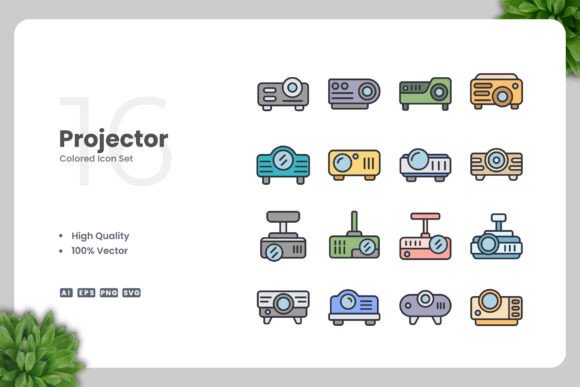
Projector Colored Icons for Modern Design
Icons are the unsung heroes of visual communication. A well-crafted icon can replace paragraphs of text, guide a user through an interface, or add a touch of personality to a brand. But finding icons that are both beautiful and functional is harder than it sounds. Many sets fall short—either too detailed for small screens, too generic to stand out, or locked in proprietary formats that make customization a headache. That’s where Projector Colored Icons come in. This collection offers a refreshing blend of simplicity, color, and practicality, designed to work across nearly every medium you can think of.
Whether you’re a freelance designer building a client’s website, a marketer crafting social media visuals, or an educator preparing handouts, these icons can save you time while elevating your work. Let’s explore what makes them special and how you can put them to use.
What Are Projector Colored Icons?
Projector Colored Icons is a set of vector graphics that combine clean, simple outlines with carefully chosen colors. Each icon depicts a common object, action, or concept—think devices, tools, communication symbols, and more—in a style that’s instantly recognizable. The design philosophy here is “simple and clean”: minimal lines, generous white space, and a consistent visual weight. The colors add warmth and clarity without overwhelming the core shape.
Because they’re vectors, these icons are resolution-independent. You can scale them to fit a giant billboard or a tiny button, and they’ll remain crisp. The files come in multiple formats: Adobe Illustrator (AI) source files, EPS Version 10, SVG, and PNG with transparency. A handy readme.txt is also included, which is a nice touch for anyone who wants a quick setup guide.
Key Characteristics That Set Them Apart
Let’s get into the specific qualities that make Projector Colored Icents worth your attention.
- 100% Vector: Every icon is built from paths and curves, not pixels. That means infinite scalability without quality loss.
- 100% Customizable: Change colors, resize, rotate, or even combine elements. The source files are fully editable in any vector software like Adobe Illustrator or CorelDRAW.
- High-Quality Design: The linework is precise, the proportions are balanced, and the color palette feels modern without being trendy.
- Easy Drag and Drop: The files are organized so you can simply drag them into your project. No complicated importing steps.
- Multiple Formats: AI, EPS, SVG, and transparent PNG cover almost every use case from print to web to video.
These aren’t just bullet points—they translate into real-world benefits. For instance, the customization ability means you can match the icons to your brand’s exact color scheme in seconds. The drag-and-drop ease speeds up your workflow, especially when you’re on a deadline.
Practical Applications Across Different Fields
The versatility of Projector Colored Icons is one of their strongest selling points. Here are some realistic scenarios where they shine.
Websites and Mobile Apps
In digital interfaces, icons serve as visual shortcuts. Use them for navigation menus, feature lists, call-to-action buttons, or empty states. Because the icons are colored but still simple, they work well on both light and dark backgrounds. If your app has a flat design language, these icons will blend right in. You can even use the SVG format for responsive sites—adjust size with CSS and change colors on the fly if you embed inline.
Social Media and Digital Marketing
Social posts need to grab attention in a split second. Colored icons can illustrate key points in infographics, highlight benefits in promotional graphics, or serve as bullet icons in quote cards. For example, a marketer promoting a productivity app could use the projector icon (the namesake) to represent presentations, and a checklist icon for task management. The transparency PNGs are perfect for layering over photos or gradient backgrounds.
Print Materials: Flyers, Posters, and Banners
Print is a different beast—you need high resolution from the start. Vector icons are ideal because you can export them at 300 DPI for any size. Use them on a flyer for a local event, on a poster to break up text, or on a banner to direct attention. Because the colors are pre-selected, you don’t have to spend time tweaking CMYK values unless you want to. The EPS format is especially professional for print shops.
Books, eBooks, and Educational Content
Educators and authors often need to illustrate concepts without overcomplicating the page. Simple colored icons can replace stock photos in textbooks or online courses. For instance, a chapter on communication might use a speech bubble icon, while a section on technology could feature a laptop or projector. The clean design ensures the icons don’t distract from the text—they support it.
Infographics and Data Visualization
Infographics rely on icons to make data digestible. Use Projector Colored Icons as repeating visual elements for each section, or combine them with charts. Their consistent style ties the whole graphic together. Because you can edit them, you can also change icon colors to match a specific palette without harming the overall design cohesion.
Branding and Identity Projects
Even though these icons are sold as a set, you can adapt them for branding purposes. A small business might use a projector icon as part of their logo if it fits their industry. Or a designer could pull individual icons to create a custom icon set for a client. The vector source files let you adjust stroke weights, fill colors, and even add new elements—giving you a head start without starting from scratch.
Usability and Efficiency: Why Designers Love Them
From a workflow perspective, Projector Colored Icons are a joy to work with. The “Easy Drag and Drop” claim is real: you get a folder with clearly labeled files. Open the AI or EPS file, and each icon is on its own artboard or layer. In Illustrator, you can use the Direct Selection tool to change any color instantly. In CorelDRAW, the process is similarly straightforward. The PNG transparency files save you from having to remove backgrounds yourself—just place them into your design.
For teams, the shared file formats mean everyone can collaborate regardless of software preferences. A designer using Affinity Designer can import the SVG or EPS files, while a web developer can drop the SVGs directly into code. The readme.txt file provides a quick overview of folder structure and usage tips, which is helpful for less experienced team members.
Considerations When Using These Icons
No product is perfect for everything. Here are a few practical points to keep in mind when deciding if Projector Colored Icons fit your next project.
- Style Consistency: The icons all share the same look—colored, simple, flat. If your project requires a more detailed or skeuomorphic style, these might feel out of place.
- Color Palette: The included colors are well-chosen but fixed in the original set. You have to edit them if your brand uses specific hues. That’s easy with vector software, but it’s an extra step.
- Number of Icons: The set is presumably curated, not massive. If you need a huge library covering every niche concept, you might need to supplement with another collection. But for common symbols (devices, communication, business, media), it’s likely sufficient.
- Licensing: Check the included readme for usage rights. Most icon sets allow commercial use, but it’s always wise to confirm.
Also, consider your audience. These icons have a modern, approachable feel—great for startups, tech companies, and educators. But if your brand is ultra-traditional or luxury-focused, the simple colored style might not convey the right tone. As always, test a few icons in context before committing.
Getting the Most Out of Projector Colored Icons
To make these icons work for you, start by opening the AI or EPS file in your vector editor. Browse the entire set to see what’s available—some icons might spark ideas you hadn’t considered. Then, choose a few that align with your content. For a website hero section, pair an icon with a short headline and a call-to-action. For a social media infographic, use multiple icons as visual anchors.
Don’t be afraid to edit. Change the color of the projector icon to match your primary brand color. If an icon feels too large or small, scale it uniformly. You can even rotate icons for dynamic layouts. Because these are vectors, you can combine two icons into a custom compound symbol—for example, overlay a mail icon on a globe for “global communication.” The possibilities are limited only by your imagination.
Finally, keep the files organized. Save your customized versions separately so you can reuse them later. Name them clearly (e.g., “projector-icon-blue.ai”). Over time, you’ll build a library of tailored icons that speed up future projects.
Final Thoughts
Projector Colored Icons hit a sweet spot between aesthetic appeal and practical utility. They’re simple enough to be versatile, yet colorful enough to add personality. The vector format ensures they work in any context, from retina displays to billboard prints. With easy customization and a range of included file types, they remove the friction that often comes with using icon sets. Whether you’re a seasoned designer, a busy entrepreneur, or a teacher putting together a presentation, these icons can help you communicate clearly and beautifully.
Take a look at what Upnowgraphic has put together. With high-quality design and thoughtful file delivery, Projector Colored Icons are ready to become a go-to resource in your creative toolkit. Have a great day, and happy designing.